
农历新年再临,生活仍然十分抽象,要问具体抽象在哪里?都具体了还怎么抽象?每每按下熄屏按键,叹一口气,或者吸一口烟,内心涌出一阵…
不如躲进电竞成一统,点开STEAM,然而,鼠标在绿色大按钮前转了三圈,又毅然决然地奔赴了X,然后就是Google Chrome,听列位Oldies讲讲过去的故事,画面斑斓,仿佛又回到暑假的那个下午,我按开CRT的电源,然后消磁功能发出“嗡”的一声响。Himem is testing the memory ……. done.
Anyway,今天我们来研究运用Docker来部署你自己的云上DOS环境,如果只是为了玩DOS游戏的话,类似的方案其实有很多,比如rwv大神的在线dos游戏,这位大神还有另一个群辉玩家十分熟悉的网名oldiy,他也发布了可以在群辉上部署的docker镜像。Google下Online DOS Game,也有制作很精良的网站,比如https://www.dosgames.com/,在github或者dockerhub上继续深耕,会有很多类似的项目,这些项目对于挑的玩两下的童鞋来说,属于是即用即抛型,体验是极好的,服务器开销也小,然而,对于偶们这些少年立志学习debug要写出自己COM文件然后蹉跎40yearsandcounting的屌丝来说,它们都是使用js在本地构建了虚拟机,然后下载回数据来在浏览器里加载运行,系统的功能始终在本地,存档支持即便有,实现也是靠本地cookie(么?),总的来说,不够“云”。好了,废话讲完,隆重介绍下我们今天要站肩的大神:
搜了搜,大神大名Blaize Stewart,还有一个个人网站,本尊青年时还是很帅的,居然是文理双修的作家,Azure专家,然而对比个站中的英姿飒爽和管站中的,厄…,不知道为什么,总有一种猩猩相惜的感觉。
大神的X在这里,深耕深耕,发现油管还改过一次名字,从惯用的theonemule到techonfire,是想火么?靠讲Docker或者Azure能火么?想想就觉得,骡大咱这都唱美声的,就不要硬刚HIPHOP了吧,不信你去看看时下trendy的各种平台发布,反智的怎么也有75啪,猩猩相惜啊。
这次的站肩没有电梯,我们得拾级而上,手搓一个docker image出来。
点开大神在github上的repo,https://github.com/theonemule/dos-game,对于不会用git的我来说,直接点绿色的<>code按钮,最后一项Download ZIP把项目下载回来,解压。
使用notepad++,打开Dockerfile,修改几处地方,于是我提前踩过的坑,各位看官您就不用了。
ENV USER=root
ENV PASSWORD=password1
这里修改好自己的账户和密码。
 echo "tzdata tzdata/Areas select America" > ~/tx.txt && \
 echo "tzdata tzdata/Zones/America select New York" >> ~/tx.txt && \
这里的时空选择,改不改其实都行。
#Install VirtualGL and TurboVNC
RUN  wget https://gigenet.dl.sourceforge.net/project/virtualgl/3.1/virtualgl_3.1_amd64.deb && \
     wget https://zenlayer.dl.sourceforge.net/project/turbovnc/3.0.3/turbovnc_3.0.3_amd64.deb && \
     dpkg -i virtualgl_*.deb && \
     dpkg -i turbovnc_*.deb
注意这里要安装两个不在官方源里的软件,我给贴上:
https://sourceforge.net/projects/virtualgl/files/3.1/virtualgl_3.1_amd64.deb/download
https://sourceforge.net/projects/turbovnc/files/3.0.3/turbovnc_3.0.3_amd64.deb/download
把这两个软件下载回来,放进解压文件夹里,然后修改上段代码为:
#Install VirtualGL and TurboVNC
COPY virtualgl_3.1_amd64.deb /etc/
COPY turbovnc_3.0.3_amd64.deb /etc/
RUN  dpkg -i /etc/virtualgl_3.1_amd64.deb && \
     dpkg -i /etc/turbovnc_3.0.3_amd64.deb
这里必须要指定一个绝对地址,放进~里不行,为稳妥直接放进etc里,为了不强迫,你可以将来在建成的容器里删掉这两个文件。
接下来,把
echo "exec dosbox -conf ~/.dosbox/dosbox.conf -fullscreen -c 'MOUNT C: /dos' -c 'C:'">> ~/.ratpoisonrc && \修改为
echo "exec dosbox -conf ~/.dosbox/dosbox-0.74-3.conf">> ~/.ratpoisonrc && \这是因为,安装DOSBOX的时候会生成一个带版本的conf文件,目前DOSBOX已经停留在这个版本很久了,如果不修改,将来会出来两个CONF,然后你肯定也不知道哪个起作用,那些mount可以将来在这个带版本的conf里面做,好了又为您节省1小时。
删除掉以下三行
export DOSCONF=$(dosbox -printconf) && \
  cp $DOSCONF ~/.dosbox/dosbox.conf && \
  sed -i 's/usescancodes=true/usescancodes=false/' ~/.dosbox/dosbox.conf && \
理由同上,直接修改自带安装的conf即可。
如果对骡大为你自带测试的两个游戏没兴趣,可以直接删除掉以下两行
COPY keen /dos/keen
COPY doom /dos/doom
好了,点保存,点开supervisord.conf,直接贴成我改好的
[supervisord]
nodaemon=true
pidfile=/root/supervisord.pid
logfile=/root/supervisord.log

[program:beforevnc1]
command=/usr/bin/rm -rf /tmp/.X11-unix
autostart=true
autorestart=false
redirect_stderr=true

[program:beforevnc2]
command=/usr/bin/rm -rf /tmp/.X1-lock
autostart=true
autorestart=false
redirect_stderr=true

[program:vncserver]
command=vncserver
stdout_logfile=/root/x11vnc.log
redirect_stderr=true

[program:websockify_vnc]
command=websockify --web /usr/share/novnc 8080 0.0.0.0:5901
stdout_logfile=/root/websockify-vnc.log
redirect_stderr=true

[program:pulseaudio]
command=/usr/bin/pulseaudio --disallow-module-loading -vvvv --disallow-exit --exit-idle-time=-1
stdout_logfile=/root/pulseaudio.log
redirect_stderr=true

[program:audiostream]
command=tcpserver 0.0.0.0 5902 gst-launch-1.0 -q pulsesrc server=/tmp/pulseaudio.socket ! audio/x-raw, channels=2, rate=24000 !  opusenc ! webmmux ! fdsink fd=1
stdout_logfile=/root/audiostream.log
redirect_stderr=true

[program:websockify_audio]
command=websockify 8081 0.0.0.0:5902
stdout_logfile=/root/websockify-audio.log
redirect_stderr=true

[program:nginx]
command=/usr/sbin/nginx -g "daemon off;"
autostart=true
autorestart=true
startretries=5
numprocs=1
startsecs=0
stdout_logfile=/root/nginx.log
这里加入了beforevnc1和beforevnc2两个块,目的是解决原作容器重启以后VNC卡死的bug,本来supervisor是监控运行的,因为只会在entrypoint里加内容实现容器效果,所以就照猫画虎放在这里,实测除了会在log里丢一些exitcode的报错以外,无任何副作用。把127.0.0.1换成0.0.0.0是因为websocket的一些引用问题,其实我也不想懂,直接换就好。
OK,接下来点开nginx.conf,把两处127.0.0.1修改成localhost,希望加验证的朋友可以在这个时候加入auth_basic,不想懂的朋友直接保存就OK。
好了,moment of truth,在你的机器上,使用命令行进入到这个修改了半天的文件夹,执行
docker build -t dosbox .这里的dosbox就是将来你的镜像名字,可以自己随便取,不要忘了后面的句点,代表本目录。
大概需要二十分钟,取决于网络速度,如果一切顺利,你可以通过docker命令查看一下容器。
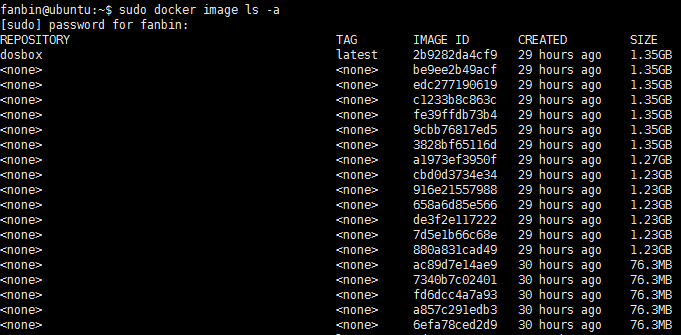
会出来一堆中间容器,不用管,只要有了最上面一个dosbox的image,就算成功了。
然后就是用这个image跑一个容器,你可以先把你收藏的DOS游戏放进一个目录,然后用-v参数映射到容器里的目录中,类似:
sudo docker run -d --name=dosbox -p 4080:80 -v /mnt/sdc/dosgames:/dos dosbox
跑起来以后,用浏览器点开你服务器的端口,选vnc.html,输入密码,看到dos界面,就算容器成功了。
接下来,我们再来搞一些finetweak
使用docker命令进入容器,类似:
sudo docker exec -it dosbox /bin/bash
然后,装一个nano
apt install nanocd ~ 回车进入~目录,cd .dosbox,nano dosbox-0.74-3.conf 回车,把里面的fullresolution= 后面的换成desktop,output= 后面的换成opengl,userscancodes= 后面的换成false,aspect= 后面的换成true,scaler= 后面的换成none,移动到最后,加入以下命令
mount c /dos
c:
然后,Ctrl+O,回车,Ctrl+X,退出。
继续修改,打开/etc/tightvncserver.conf,修改
$geometry = "640x480";注意要把前面的注释去掉,后面把分辨率改好,dos时代这个就叫高清了。不改的话X桌面会比较大,很傻。保存,退出。
命令行exit一下,再重启一下容器
sudo docker restart dosbox登陆一下,注意,这里有一个很tricky的地方,如果你是局域网访问,必须在浏览器里输全网址,类似http://192.168.2.230:4080/vnc.html,如果丢了前面的http,会发现ui.js里的import里没有webaudio,里面就会丢声音,谁的问题?chrome,容器,原作,image,ws协议,不想懂。为您节约3小时。映射以后的跨网登陆或者反代就不会有这个问题。局域网访问的同学可以收藏这个写全的地址。
然后你就有:

如果你出来是小屏幕,按ALT+ENTER可以全屏到桌面,然后在左面VNC控制的菜单里可以选择本机缩放,再F11全屏,听着熟悉的音乐,熟练的dir,cls,cd,play。
你暑假的那个夏天,回到了么?

2024年2月19日更新:
经过进一步测试,原来dosbox-0.74-3.conf里的fullscreen=后面可以改成true,output=后面可以改成opengl,这样似乎性能更好一些。
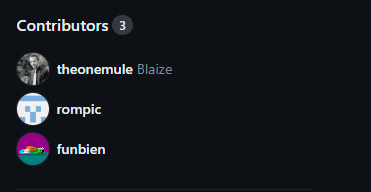
在和原作Blaize大佬沟通过后,我头一次真正运用了一回github,将本文中对supervisord.conf的修改做成一个Pull Request,被大佬纳入了主分支,也算过了一把开源的瘾。